

Getting started
Sign up → root machine with a live URL. About two minutes.
There are two ways in, and they lead to the same kind of account. Sign up on the web with a passkey and use the phone app, or sign up over SSH, where your SSH key is your account. No passwords either way, and you can add the other way in later.
Most things work two ways: a one-shot ssh command from your laptop, or the
interactive dashboard. Each step shows every way that
applies.
1. Sign up
On the web
Open ironwire.sh/signup, pick a handle, enter your email and choose a pool size (1 to 4 units). Then create a passkey on your device and pay. Your account exists once the payment goes through; the page then tells you where to sign in: the ironwire app (Sign in with passkey), or a terminal (see log in to existing account). Leave the payment page without paying and nothing is charged; the handle is released.
If signups are closed for a while, or the fleet is full, the page offers the waitlist instead of the form: you never pay and then wait.
Over SSH
Have an invite code? Run ssh ironwire.sh, choose enter an invite code
and paste it.
No SSH key yet? Make one:
$ ssh-keygen -t ed25519
Pick a handle, your public account name. Handles are lowercase
(a-z0-9-, 2 to 31 characters, starting with a letter) and immutable:
your handle becomes part of every machine URL, so choose carefully.
ssh
$ ssh ironwire.sh signup alice --accept-terms
handle       alice
plan         1 unit · 2 vCPU, 4 GiB RAM, 50 GiB disk, 50 machines
paymentlink  https://ironwire.sh/s/k4m9
expires      in 45m — the handle is released then
  [QR code of the payment link]
once paid, just connect:  ssh dashboard@ironwire.sh
dashboard
$ ssh dashboard@ironwire.sh
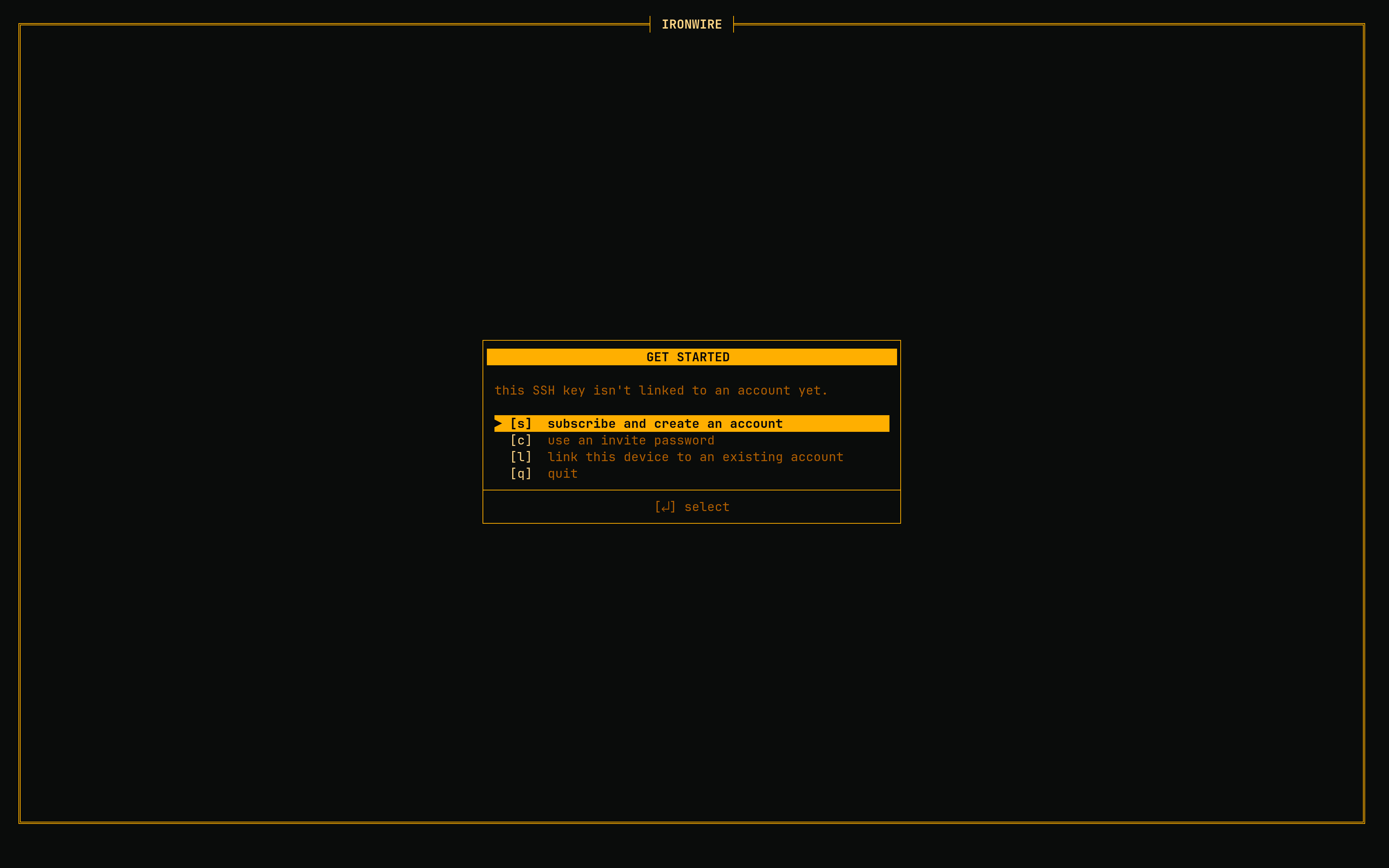
this SSH key isn't linked to an account.
  [e] log in to existing account (passkey)
  [s] subscribe and create an account
  [c] enter an invite code
  [l] link this device to an existing account
  [q] quit
The one-shot command reserves your handle, opens a checkout and prints the payment link, plus a QR code, so the browser that pays can be the phone in your hand rather than the machine you are typing on. It does not wait: pay whenever, and the moment the payment lands your account exists. Then just connect.
--accept-terms is required: it accepts the
terms of service and privacy policy. Add
--units N for a bigger pool (omit it for the smallest plan, resizable later),
or --json for the link, plan and expiry as fields.
The interactive route is the same purchase with the steps on screen: press s, accept the terms with y, choose your handle and pool size, and the screen turns into your dashboard the moment the payment lands; no reconnect.
ssh ironwire.sh signup --abort releases it so you can retake it at
once.2. Create a machine
A machine is a real virtual machine: own Linux, disk, and IP, booted in seconds with default sizing. Machine names follow the same rules as handles. See machines & lifecycle for images, sizes, and flags.
ssh
$ ssh dashboard@ironwire.sh create mybox
created mybox
  url: https://mybox-alice.ironwire.xyz
  ssh: mybox@ironwire.sh
dashboard
Press n, name it, confirm. The list shows a spinner while it boots.
3. Shell in
You're root inside your own VM. Install packages, run services, do as you please.
ssh
$ ssh mybox@ironwire.sh
root@mybox:~#
dashboard
Select the machine, press Enter: a framed shell with tabs (F5/F6), detach (F2), scrollback, and mouse support. File manager on f.
4. Open its URL
Every machine gets a live HTTPS URL: https://<machine>-<your-handle>.ironwire.xyz.
It fronts port 8000 inside your machine by default. Start anything that listens
on 8000 and it's on the internet, TLS included:
ssh
$ ssh mybox@ironwire.sh 'python3 -m http.server 8000 &'
dashboard
Select the machine, press Enter to open a shell, start your server there. The machine's URL is right in the list's URL column.
Open https://mybox-<your-handle>.ironwire.xyz in a browser. The certificate is
issued automatically on first visit. Different port, extra ports, custom domains: see
networking & urls.
Where to next
- Connecting & keys: add your other devices, manage keys
- The dashboard: live stats, shells, file manager
- The shared drive: storage every machine can mount
- Environment variables: carry configuration into machines
- Command reference: every command and flag